Transition to Monash Okta
Monash XNAT has upgraded to the Monash Okta login system. After October 16th, you will not be able to access your old XNAT account and must ask project owners to re-invite you to projects.
Please follow these steps to create your Monash account:
- Go to https://xnat.monash.edu/. Click the Sign In button:

- Select your institution or AAF if applicable. If your institution is not listed, see below:
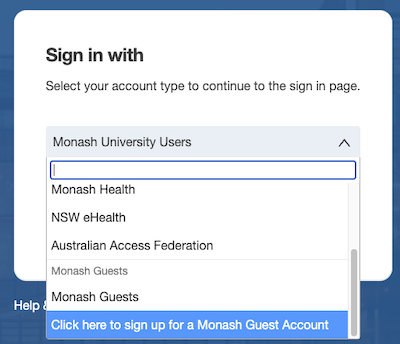
Monash Guest
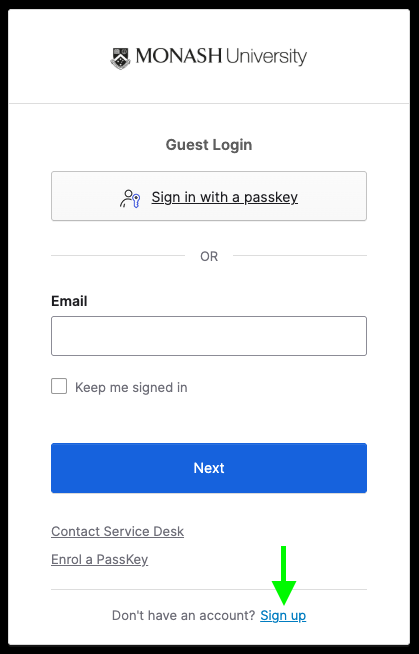
If your institution is not listed, sign up for a Monash Guest account with your organisational email:
-
Log in with your institutional credentials.
-
Once you are redirected back to XNAT, select An Existing MXNAT Account:

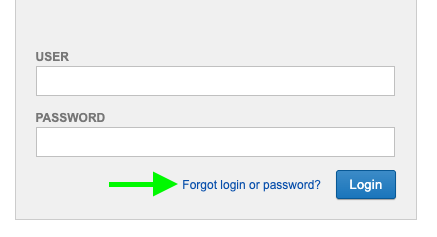
- Enter your old XNAT username and password. If you do not remember your login details, click the Forgot login or password? link and follow the steps.
Using XSync, XNAT Desktop Client and M3
Your old username and password will no longer be valid for external tools. You will need to use Alias Tokens. See Generating Alias Tokens.